sustainedsound:
Eternal Return
Build music and soundscapes from the geometry of layered, recurring time.
To get started, download the app and the container (Glaze).
Eternal Return is...
... a macOS composition tool built around concentric rotating timelines.Sound objects orbit rings that turn at their own speeds, triggering as cursors sweep past them.Audio and MIDI layers interweave in recurring time, building textures that evolve with every revolution.Save your experiments as projects. Route MIDI to external synths and Eurorack. Import audio and let it cycle.Music from the geometry of returning time.
Using the app is simple...
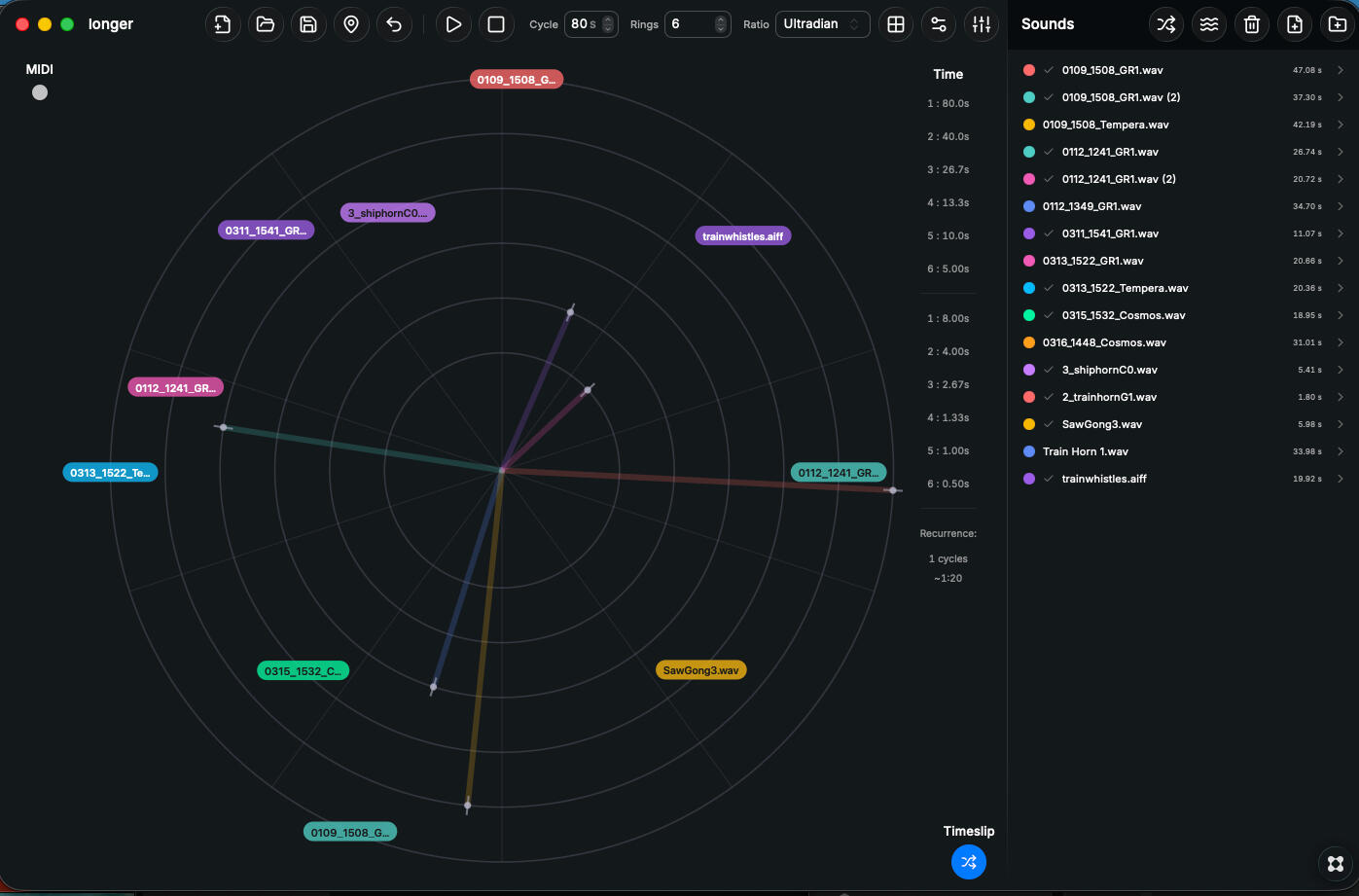
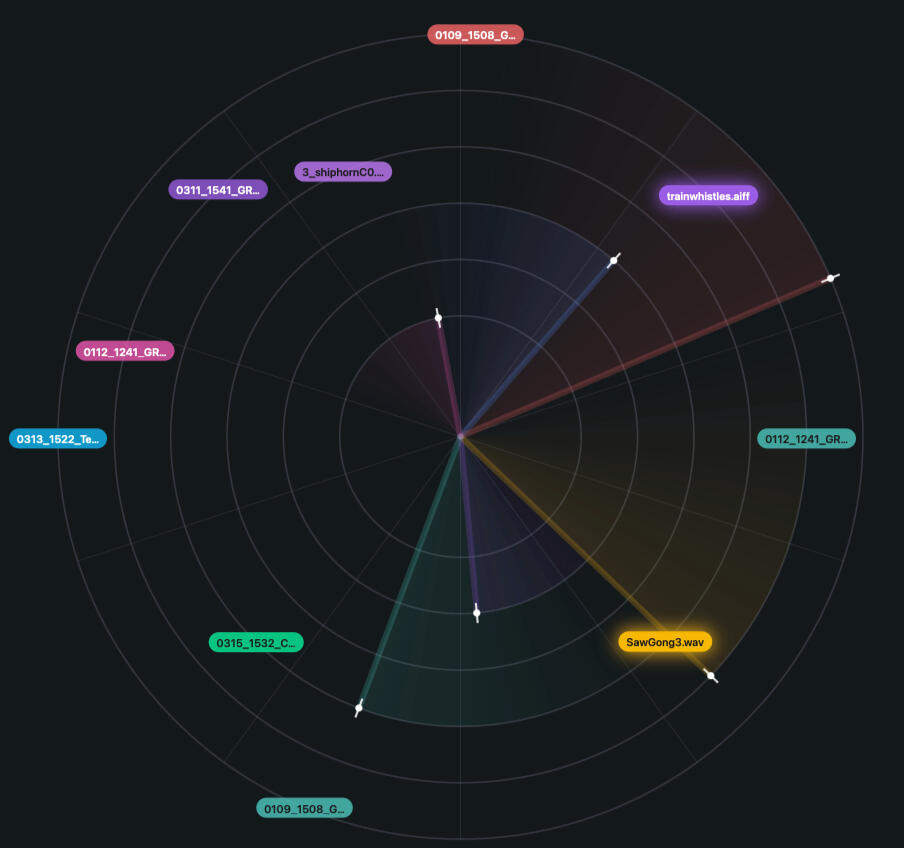
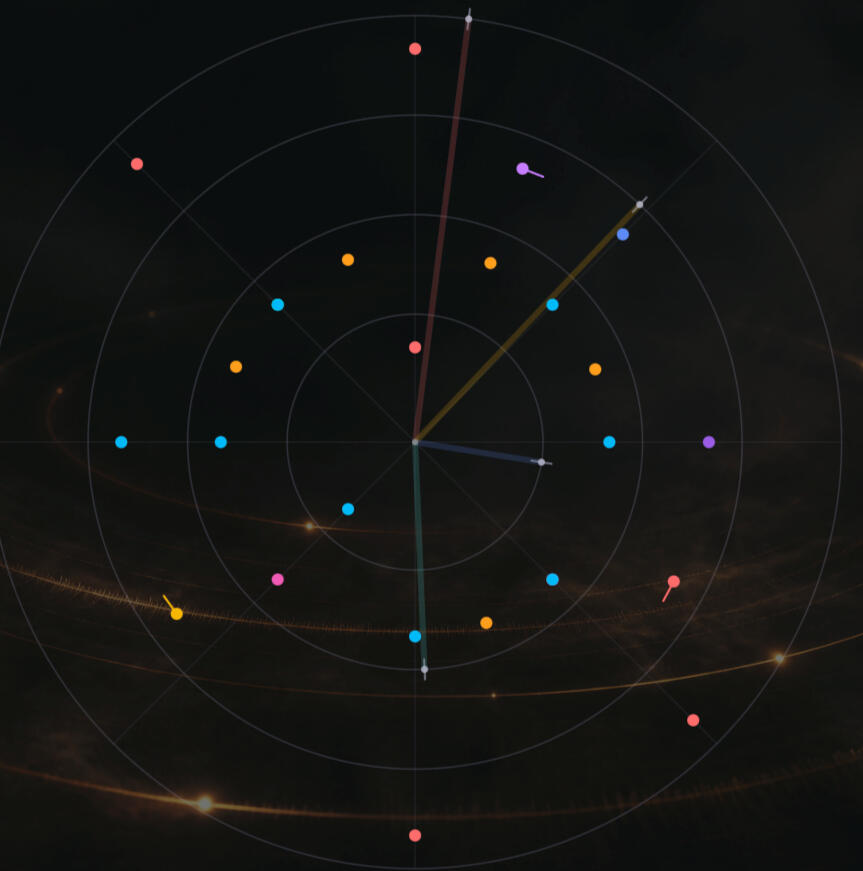
You import audio files, and then drag them to the canvas. You can place them freely or snap them to the grid. When the rotating playhead passes, the clip plays.
You can select different relative speeds for the playheads, and have them jump randomly and change direction.
You can play all or part of a clip.
You can also add midi events - a note on and off, and up to four control change envelopes per event.
Rings and grids...
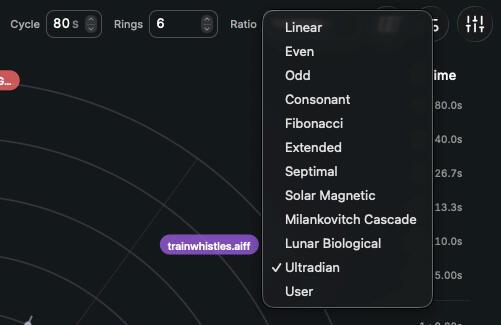
Every preset in Eternal Return is a set of ratios - the speed of each playhead relative to the outer ring. And there is a choice a of grids - the division of time.
Mixdown and stems
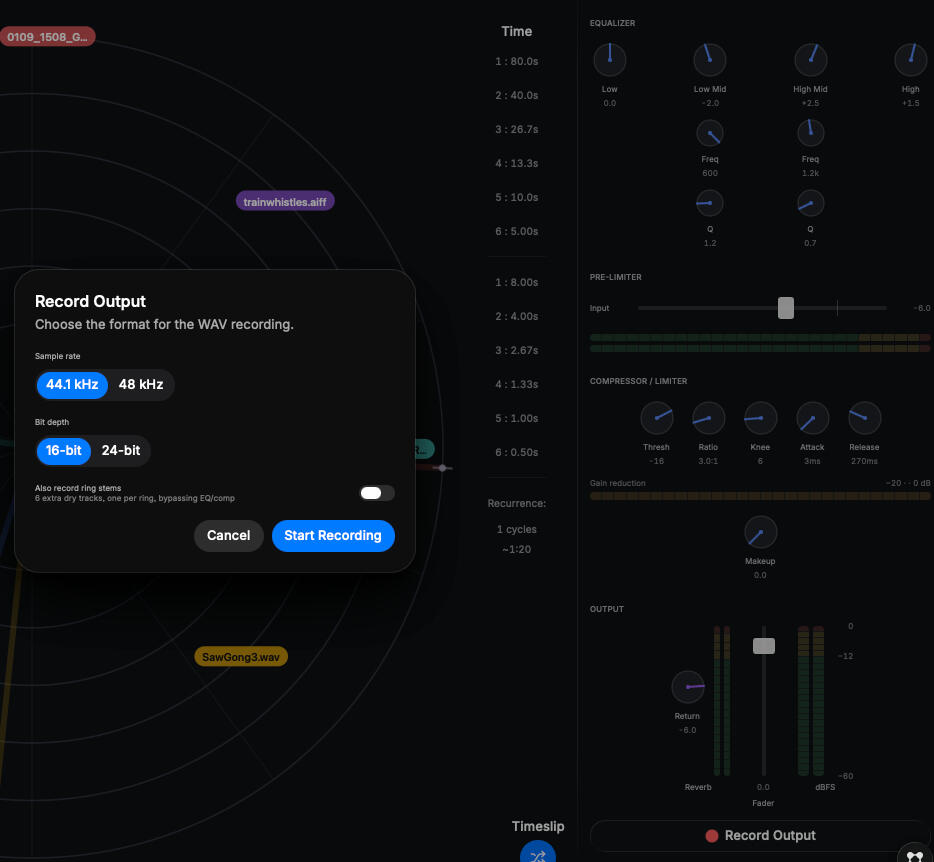
You can set everything in motion and either record the results as a stereo file, and optionally record the playheads as separate tracks to import to your DAW.
Eventually...
... all things return to the beginning.But you can delay that inevitability in so many ways...
Intro to Eternal Return
Some basics...
Import audio files
Drag and drop files or folders into the Sounds Pool, or click the Import button at the top right.
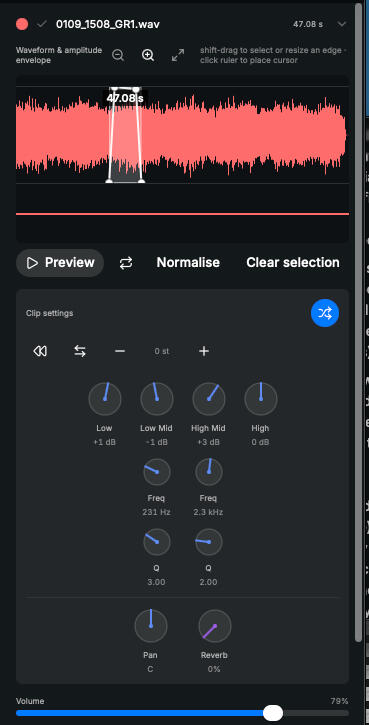
By clicking on a clip name you open its editing window where you can select which part of the clip to play, create level and panning envelopes, and make other changes to the way the clip plays.
The double arrow icon opens a panel where you can randomise several of the playback settings.
Drag and drop them
Click and drag a clip to place it onto the canvas. You can place it anywhere on a ring, or set the gridlines to be magnetic, so that clips snap to those positions. You can click a clip on the Canvas and its edit window will open.
In the top left of the Canvas is a dot (MIDI). Drag this to a position on a timeline to create a midi event. Click the new dot to open its edit window.
Speed, ratio and grid
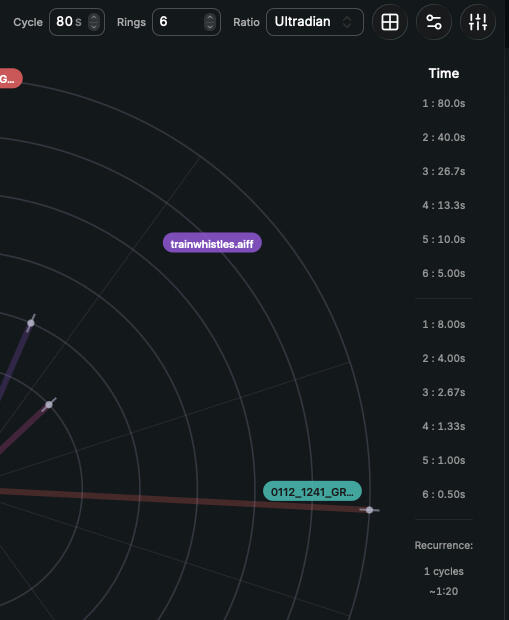
Everything depends on the Cycle duration - the time it takes for a playhead to travel around the outermost ring. You can set between 3 and 6 rings.
Ratio sets the relationship between rings, and so determines how fast the inner playheads move. If you click on the Time label you can see how long each ring's cycle is and the time between grid points.
The square grid icon opens the radial grid menu, where you can set the number of divisions, and turn snap on and off.
Timeslip opens a window where you can set the likelihood that a playhead will jump to a random position after it reaches "12 o'clock", and the likelihood that it will play in reverse.
Midi
You can also place Midi events on the canvas. Each Midi dot can contain a Midi Note, up to four Control Change curves and a Program Change message. you can use these to control soft synths on your Mac, desktop modules via a Midi interface, or Eurorack Modules using an appropriate Midi to CV convertor module such as the Portail.
Group Containers
You can also place Midi events on the canvas. Each Midi dot can contain a Midi Note, up to four Control Change curves and a Program Change message. you can use these to control soft synths on your Mac, desktop modules via a Midi interface, or Eurorack Modules using an appropriate Midi to CV convertor module such as the Portail.
Patterns
You can also place Midi events on the canvas. Each Midi dot can contain a Midi Note, up to four Control Change curves and a Program Change message. you can use these to control soft synths on your Mac, desktop modules via a Midi interface, or Eurorack Modules using an appropriate Midi to CV convertor module such as the Portail.
Rings and Grids
The original presets are mathematical: Linear, Even, Odd, Consonant, Fibonacci, Septimal, Extended. They divide time by integers, harmonics, phi, and just intonation.The Cycle Atlas asked a different question: what ratios already exist in nature?It maps over seventy documented cycles across the human body, the Moon, the Earth, and the Sun. From this research, three new presets were derived.Solar Magnetic follows the Sun's activity cycles - from the 11-year Schwabe cycle up to the 2,300-year Hallstatt cycle.
These are the rhythms that drive climate and biology on a grand scale.Lunar-Biological uses the lunar octave cascade. Divide the synodic month by two, again and again, and you land on circadian rhythm, the 90-minute BRAC, and other body clocks. The Moon and the body share a frequency ladder.Ultradian draws from sub-daily biological rhythms - sleep cycles, nasal cycles, the segmentation clock.
These are the fastest natural oscillations we live inside.The idea is simple: music built from ratios that already recur in nature resonates with something the body already knows.
If you are interested in the complete document, you can download it here:
Mixdown and Stems
Mixdown and StemsEternal Return records exactly what you hear. Start a recording and the app captures the full master output — every ring, every triggered sound, every effect — as a WAV file ready to use.Before it reaches the recording, the sound passes through the Output panel: a four-band EQ to shape the tone, a compressor and limiter to control dynamics, and a reverb return to set the wet level of the shared convolution reverb. An input trim and stereo meters let you fine-tune the gain staging before you hit record.You can also record ring stems. This captures each active ring as its own isolated track, dry and unprocessed, saved alongside the master file. It gives you the flexibility to mix elsewhere, or to keep a clean backup of every layer.Choose your sample rate and bit depth when you start, and everything is saved into the project's Recordings folder, named and timestamped automatically.
There is an manual included in the app, which you can access from the Help menu. There will be a more detailed manual with images later, you'll be able to download it here:
Midi Events
Eternal Return doesn't just spin sounds in circles - it can speak to the outside world.MIDI Dots are small trigger points that sit beneath each ring, sending note and controller data to any CoreMIDI destination: a soft synth in another app, a hardware module on your desk, or a CV converter feeding your Eurorack.For each dot on the canvas you can set pitch, velocity and duration, and draw up to four breakpoint envelopes for continuous control changes.A dot might fire a drum machine every time the outer ring completes its lap, or sweep a filter on your modular as an inner ring spins faster turning the app from a self-contained instrument into the rhythmic heart of a larger system.
If you are interested in the complete document, you can download it here:
New Features
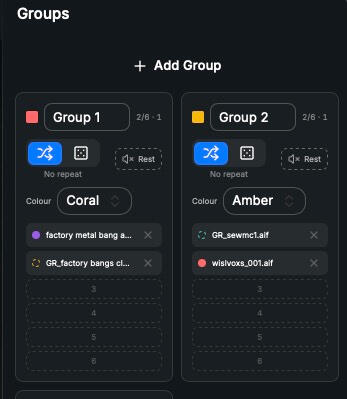
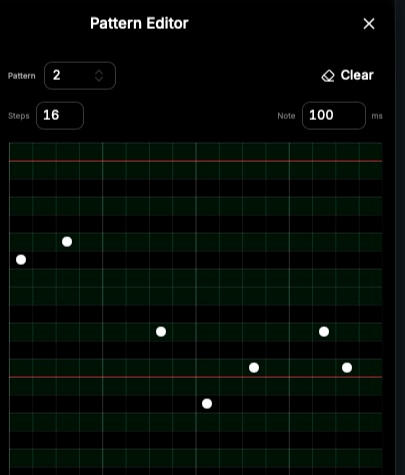
MIDI and Audio GroupsGroups let you treat a collection of sounds as a single object on the rings. Drag clips or grain players into a group container, place it on a ring, and each time the cursor sweeps past it the group picks one slot to play — either shuffling through without repeats or choosing at random. A "Rest" slot adds silence into the rotation, so you can build breathing, unpredictable rhythms from a small set of sources. MIDI Groups work the same way, but their slots hold MIDI dots — notes, patterns, or CC-only events — letting you sequence hardware or other apps from a rotating palette of musical ideas.PatternsPatterns are six shared mini piano-rolls that any MIDI dot can reference in Pattern mode. Each pattern offers a variable-step grid where you can click in notes, drag them to move, and shift-drag to stretch their length across steps. Faint green rows mark scale degrees and red lines show octaves, keeping things readable even when transposed. Because every pattern-mode dot shares the same six patterns, editing one updates every dot that uses it — a fast way to propagate a rhythmic motif across the canvas. Patterns can be played in different modes, either fixed or selected randomly: Forward, Reverse, Inverted, Reverse-Inverted.Grain PlayersGrain Players bring granular synthesis onto the rings. Each player loads its own audio file and, when a ring cursor sweeps it, plays a continuous cloud of grains driven by up to four breakpoint envelopes. You control grain size, density, position spread, pitch, stereo width, and window shape, then automate any of those parameters over time — including where in the file the grains read from. You can also map any of the Patterns to a parameter envelope; for example, to create a pitch sequence in the granular playback. Up to eight players per project, placed with dashed-border pills, they turn the circular sequencer into a living texture generator.WaypointsWaypoints are named snapshots of a canvas idea, stored without duplicating any audio on disk. A single waypoint remembers every ring setting, every placement, every clip setting, every MIDI dot, and every grain player — then restores them exactly when you need that idea back. They let you explore multiple arrangements from the same sound library, save happy accidents, and keep a project's history alive as a set of revivable states rather than a linear undo chain.Waypoint SequencerThe Waypoint Sequencer turns your saved canvas snapshots into a performable structure. Toggle waypoints onto tracks in a step grid, choose a trigger ring, and each cycle of that ring advances one step — automatically restoring the waypoint assigned to that column. A "Lead" time fires the switch slightly before the cursor hits the top line, so start-of-cycle events land cleanly. Save and recall sequence presets, and you have a way to compose larger arcs where entire arrangements morph in time, governed by the same circular logic that drives everything else in Eternal Return.
Companion Apps
Granular
If the six built-in Grain Players aren't enough, you can download Granular, a simple app which has 12 grain players, all controllable via Midi. The output can be routed either to System Audio, a connected audio interface, or Blackhole 16ch (or 32ch) for routing to other apps, such as Canvas Audio.AU Host
A simple, midi controllable AU Instrument host to play Midi Patterns, without having to get involved in complex instrument hosts.
If you are interested in the complete document, you can download it here:
More Audio apps, and Contact
There are several related MacOS audio apps that I built in Glaze, which you can download by clicking the links below. They are all free.
Canvas Audio is a simple to use audio workstation, a trackless DAW in which you can quickly and easily place audio files without having to worry with the complexities of a full on DAW.
Multitrack is a simple multitrack recorder for when you need to quickly capture audio without having to set your main DAW up.
Audiofile Preview is for previewing and selecting files (or parts of files) to use in other projects. You select the files you want and they are exported to a named folder for loading into Canvas Audio or your DAW.
Audio to Video is a small utility for adding an image to an audio file and exporting it in video format, for uploading to Youtube.All of these apps are free (as is the shell programme, Glaze), but if they are useful to you, and you would like to contribute to further development, or just feed my coffee habit, there is also a Donation link below.